Welcome to Optimized.app! This quickstart guide will help you get started with our API, allowing you to manage profiles, create batches, and schedule campaigns programmatically.
- Log in to your Optimized.app account
- Navigate to Organization Settings → Integration → API Tokens
- Click the New API Token button to create a new API token
Note: Only organization administrators can create API tokens
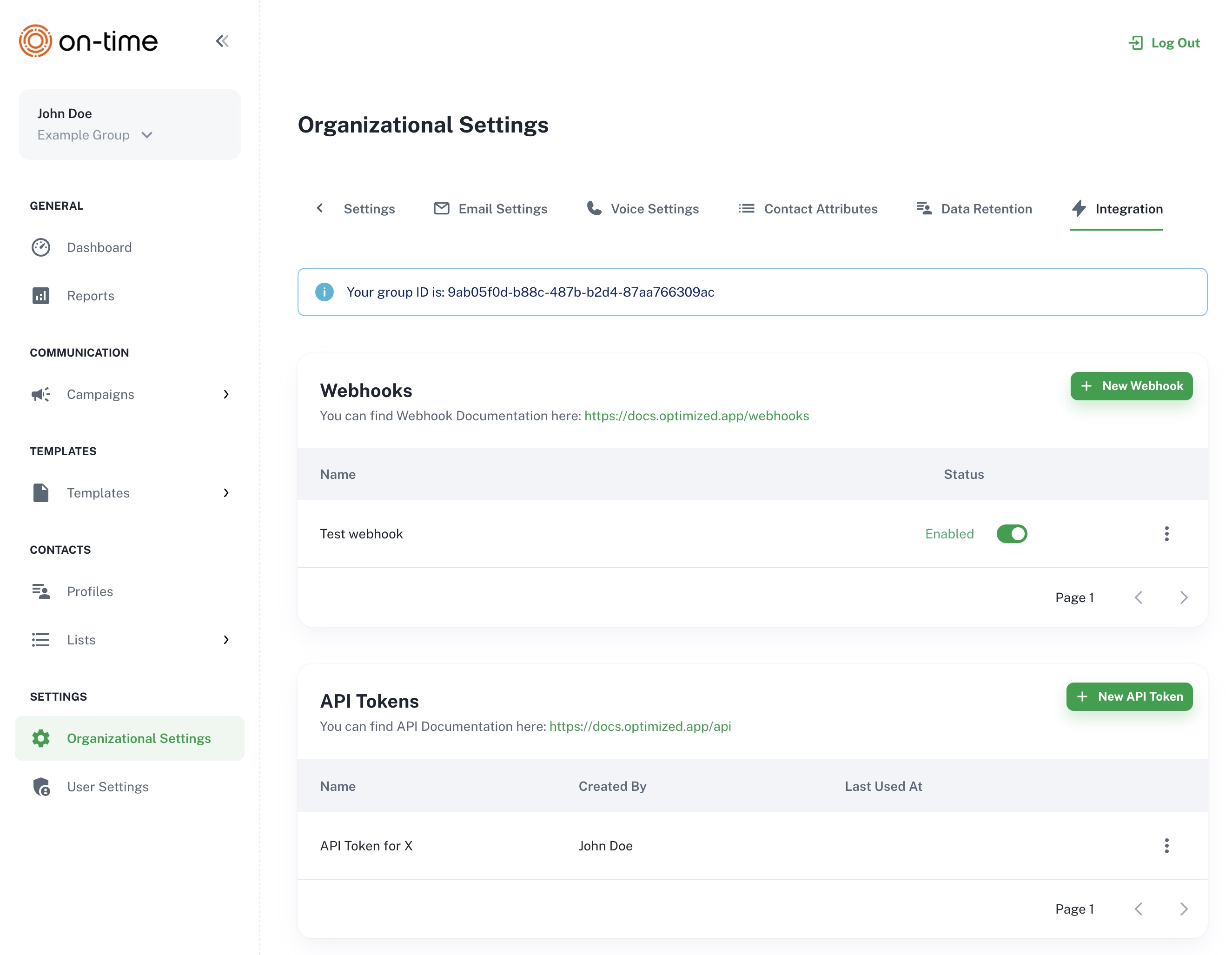
The Organization Settings → Integration screen, showing where to create a new API Tokens and find your Group ID.
All API requests must include your token in the Authorization header:
Authorization: Bearer {API_TOKEN}Example:
Authorization: Bearer 293|eyJhbGciOiJIUzI1NiIsInR5cCI6IkpXVCJ9.eyJzdWIiOiIxMjM0NTY3ODkwIn0To make API requests, you'll need your group's unique identifier (GROUP_ID) that must be included in your API requests to access specific group resources.
- Log in to your Optimized.app account.
- Navigate to Organization Settings → Integration
- Locate and copy the
Group IDfor the group you want to use in your API requests.
When making API calls, replace the placeholder with your actual Group ID in the URL path:
https://api.optimized.app/v1/groups/{GROUP_ID}/batchesExample with an actual Group ID:
https://api.optimized.app/v1/groups/cc6cdf44-acf4-4b39-bd17-55b70b769812/batchesLet's start by creating a batch of customer profiles and schedule them for a specific campaign.
Use the following curl command to create a new batch of profiles with scheduling:
curl -X POST https://api.optimized.app/v1/groups/{GROUP_ID}/batches \
-H "Content-Type: application/json" \
-H "Authorization: Bearer {API_TOKEN}" \
-d '{
  "profiles": [
    {
      "person": {
        "first_name": "Jane",
        "last_name": "Doe",
        "phone_number": "+35840123456",
        "email_address": "jane.doe@example.com"
      },
      "attributes": [
        {
          "name": "CustomerType",
          "value": "New"
        }
      ]
    },
  ],
  "schedule": {
    "start_at": "2025-05-10 14:00:00",
    "campaign": {
      "uuid": "9e679c93-ff33-4b1e-bfad-1ac77afe1aef"
    }
  }
}'profiles: An array of customer profile objects with personal information.Limit: You can include up to 50 profiles in a single request.
attributes: Custom attributes to associate with each profile.schedule.start_at: When to start the scheduled campaign in UTC (format: 'YYYY-MM-DD HH:MM:SS').schedule.calls_per_minute: Optional. Maximum calls per minute (1–60).schedule.campaign.uuid: The UUID of the campaign to schedule.
{
  "metadata": [],
  "profiles": [
    {
      "external_id": "EXT-001B233422bb",
      "uuid": "9ed85463-4f11-5fa1-8816-38677316e6a0"
    }
  ],
  "uuid": "9ed85463-5763-5983-0edc-de1f2849e543",
  "updated_at": "2025-05-08T13:40:22.000000Z",
  "created_at": "2025-05-08T13:40:22.000000Z",
  "group": {
    "uuid": "9e072d6f-0ed2-486a-baca-58f889f55cd4",
    "name": "My group"
    // Additional group information...
  },
  "campaign": {
    "uuid": "9e679c93-ff33-4b1e-bfad-1ac77afe1aef",
    "name": "Voice with question",
    // Additional campaign information...
  },
  "profile_tag": {
    "name": "Voice with question - 202505081340 - f40a3747",
    "uuid": "9ed85463-4c96-5129-ba98-f5f26004c238"
    // Additional profile tag information...
  },
  "schedule": {
    "metadata": [],
    "status": "scheduled",
    "start_at": "2025-05-10T14:00:00.000000Z",
    "uuid": "9ed85463-564e-5b8e-93be-b82173f55687",
    "updated_at": "2025-05-08T13:40:22.000000Z",
    "created_at": "2025-05-08T13:40:22.000000Z"
  }
}
This response confirms that your profiles have been created and scheduled for the campaign at the specified time.
Be aware of rate limits when using the API. The basic rate limit is 250 requests per minute per user, but some endpoints have specific limits:
- The
/v1/groups/{GROUP_ID}/batchesendpoint has a special rate limit of 10 requests per minute per group.
If you exceed these limits, you'll receive an HTTP 429 response with headers indicating:
X-Ratelimit-Limit: Maximum requests permitted per minuteX-Ratelimit-Remaining: Requests remaining in the current windowX-Ratelimit-Reset: Time when the current rate limit window resets (UTC epoch seconds)
You've completed your first steps with the Optimized.app API! Explore more advanced features in our documentation or contact our support team at ontime.fi for assistance.