Webhooks provide a powerful mechanism for applications to receive real-time notifications about events occurring in your Optimized.app account. They function as HTTP callbacks that automatically deliver event data to your specified endpoint whenever specific actions take place, such as SMS deliveries, email opens, or voice call completions.
Think of webhooks as digital messengers that automatically notify your systems when something important happens, eliminating the need for constant manual checking or polling for updates.
For example, as a financial institution sending payment reminders, you can use webhooks to automatically update your CRM system the moment a customer opens an email, responds to an SMS, or answers a call. This real-time data flow allows you to track customer engagement across multiple communication channels, optimize your follow-up strategies, and ensure regulatory compliance.
To start receiving webhook events in your application:
- Create a webhook endpoint handler to receive event data POST requests
- Test your webhook endpoint handler locally
- Configure your webhook URL in the Optimized.app platform
- Secure your webhook endpoint with signature verification
You can register one endpoint to handle several different event types simultaneously, or set up individual endpoints for specific events.
Webhooks are instrumental in creating notifications for specific events. Due to their foundation in HTTP POST, they are straightforward to implement. Some common use cases include:
- Real-time campaign monitoring: Receive instant notifications as customers engage with your messages
- CRM system updates: Automatically update customer records with the latest interaction data
- Analytics integration: Feed communication data into your analytics platform for deeper insights
- Workflow automation: Trigger follow-up actions based on customer responses
- Compliance tracking: Document all communication attempts for regulatory purposes
Developers have the flexibility to write webhook scripts in various scripting languages, such as Curl, Ruby, Python, PHP, JavaScript, and Go. Once webhook data is captured, it can be stored in a database and leveraged to assess the effectiveness of campaigns or enrich recipient profiles.
The first phase in preparing for tracking events requires developers to define the specific data they wish to collect. For example, if the goal is to identify particular events, the user URL can execute a script to capture and store relevant information in a local database upon receiving incoming POST requests. This script can also be adapted to gather additional parameters, such as campaign or profile, provided by the webhook.
| Event | Description |
|---|---|
email_delivered | The email has been sent and was successfully received and accepted by the recipient's email server. |
email_bounced | The email could not be delivered to the recipient's email server due to permanent issues. These issues may encompass factors such as bounced, or complained addresses, or addresses rejected by an Email Service Provider. |
email_failed | The email could not be delivered to the recipient's email server due to permanent issues. |
email_clicked | The email recipient has clicked on a link within the email. |
email_opened | The email recipient has opened the email. |
sms_delivered | The SMS message has been delivered. |
sms_failed | The SMS message failed to be delivered. |
voice_call_answered | The call was answered. |
voice_call_unanswered | The line called was busy or failed to answer. |
voice_call_failed | The call failed. |
frequency_rate_limit_reached | The contact attempt could not be made because the specified phone number or email address reached the frequency rate limit. The frequency rate limit can be configured at the campaign level to restrict how often a phone number or email address can be contacted within a certain period. |
Set up an HTTP or HTTPS endpoint that can accept webhook requests with a POST method. If you're still developing your endpoint on your local machine, it can use HTTP. After it's deployed to production, your webhook endpoint must use HTTPS.
Set up your endpoint function so that it:
- Handles POST requests with a JSON payload consisting of an event object
- Quickly returns a successful status code (
2xx) prior to any complex logic that might cause a timeout - Verifies the webhook signature to ensure the request is coming from Optimized.app
- Processes the event based on the event type
const express = require('express');
const bodyParser = require('body-parser');
const crypto = require('crypto');

const app = express();
app.use(bodyParser.json());

// Secret key for webhook verification
const WEBHOOK_SECRET = 'My Super Secret'; // Replace with your actual secret key

// Verify the signature
function verifySignature(payload, signature) {
const calculatedSignature = crypto
    .createHmac('sha256', WEBHOOK_SECRET)
    .update(payload.timestamp + payload.data)
    .digest('hex');

return crypto.timingSafeEqual(
    Buffer.from(signature),
    Buffer.from(calculatedSignature)
);
}

// Webhook endpoint
app.post('/webhook', (req, res) => {
try {
    const { signature, timestamp, data } = req.body;

    if (!signature || !timestamp || !data) {
      console.log('Missing required webhook parameters');
      return res.status(400).send('Bad Request');
    }

    // Verify signature
    if (!verifySignature(req.body, signature)) {
      console.log('Invalid webhook signature');
      return res.status(401).send('Unauthorized');
    }

    // Optional: Verify timestamp to prevent replay attacks
    const currentTime = Date.now() * 1000; // Convert to microseconds
    const timeDifference = currentTime - timestamp;
    // Allow webhooks from the last 5 minutes (300 seconds)
    if (timeDifference > 300000000) { // 5 minutes in microseconds
      console.log('Webhook timestamp too old');
      return res.status(400).send('Bad Request');
    }

    // Parse the data string to JSON
    const parsedData = JSON.parse(data);

    // Process the webhook based on event type
    switch (parsedData.event) {
    case 'email_delivered':
        console.log(`Email delivered to ${parsedData.profile.email_address}`);
        // Add your custom logic here
        break;
    case 'sms_delivered':
        console.log(`SMS delivered to ${parsedData.profile.phone_number}`);
        // Add your custom logic here
        break;
    case 'voice_call_answered':
        console.log(`Voice call answered by ${parsedData.profile.phone_number}`);
        // Add your custom logic here
        break;
    // Add other event types as needed
    default:
        console.log(`Unhandled event type: ${parsedData.event}`);
    }

    // Return a success response immediately, before performing any time-consuming tasks
    res.status(200).json({ received: true });
} catch (error) {
    console.error('Webhook processing error:', error);
    res.status(500).json({ error: 'Internal server error' });
}
});

// Start the server
const PORT = process.env.PORT || 3000;
app.listen(PORT, () => {
    console.log(`Webhook server running on port ${PORT}`);
});Users must provide a designated URL for requests to receive data from a webhook in JSON format. This entails setting up the URL within their application, ensuring it's accessible from the public web while prioritizing security. Webhooks will transmit data to this URL in the "application/json" format.
Here's an example of an HTTP POST made by Optimized.app:
{
  "signature": "bc7b6817e2488718317751251de60b60fd055d297587fe19fb2e9d5e2a36967c",
  "timestamp": 1706099513083629,
  "data": "{\"id\":\"01JVC8K6XDBHG3Q1KYQTTYYBDV\",\"event\":\"email_delivered\",\"group\":{\"uuid\":\"ac7b9988-86ff-4451-91fd-e6c8e2f9ea27\",\"name\":\"Company A\"},\"campaign\":{\"uuid\":\"995e0e81-c79f-41a7-aadc-a113d6087230\",\"name\":\"Basic Campaign\"},\"action\":{\"uuid\":\"995e0e82-06ff-4f7d-85b0-1a39375bb0d9\",\"name\":\"Email Action 1\"},\"profile\":{\"uuid\":\"995e0e82-454c-416c-95a1-f6a726192062\",\"external_id\":\"67482930\"}}"
}
Note: Timestamp is in microseconds.
The data includes the following common fields:
{
    "id": "01JVC8K6XDBHG3Q1KYQTTYYBDV",
    "event": "email_delivered",
    "date": "2001-10-21T08:00:00.000000Z",
    "group": {
        "uuid": "ac7b9988-86ff-4451-91fd-e6c8e2f9ea27",
        "name": "Company A"
    },
    "campaign": {
        "uuid": "995e0e81-c79f-41a7-aadc-a113d6087230",
        "name": "Basic Campaign"
    },
    "action": {
        "uuid": "995e0e82-06ff-4f7d-85b0-1a39375bb0d9",
        "name": "Email Action 1"
    },
    "profile": {
        "uuid": "995e0e82-454c-416c-95a1-f6a726192062",
        "external_id": "67482930",
        "first_name": "Jane",
        "last_name": "Doe",
        "email_address": "jane.doe@email.com",
        "phone_number": "+358451234567"
    },
    "profile_tag": {
        "uuid": "754f6305-786f-4ac3-8d7d-7cfa35f594eb",
        "name": "Contact list name"
    },
    "attributes": [
        {
            "name": "HasPaid",
            "value": "Yes"
        }
    ]
}The dataset includes additional data for voice call events. It provides information on when the call was initiated, its duration in seconds, the direction of the call (outbound/inbound), status, operator number, attempt, and a answers field that lists the questions asked during the call along with their corresponding answers.
{
    "voice": {
        "initiated_at": "2002-06-22T09:00:00.000000Z",
        "duration": 30,
        "direction": "outbound",
        "status": "answered",
        "operator_number": "+35812345678",
        "attempt": 1,
        "answers": {
            "Consent": "Yes",
            "Bank": "2"
        }
    }
}In Two-Way SMS campaigns, the SMS sms_delivered event will also include a question and the answer.
{
    "two_way_sms": {
        "answer": {
            "Consent": "Yes"
        }
    }
}
Note: When a Two-Way SMS campaign contains multiple questions, you will receive one SMS event per answered question.
To verify that incoming webhook requests are genuinely from Optimized.app and not from a third party, we recommend implementing signature verification. Optimized.app signs webhook events by including a signature in each webhook's payload.
The signature is generated using HMAC-SHA256, with your webhook secret as the key and the concatenation of the timestamp and data as the message. This allows you to verify the authenticity and integrity of each webhook request.
const crypto = require('crypto');

// Secret key shared between the sender and receiver
const secretKey = 'My Super Secret'; // Replace with your actual secret key
const receivedTimestamp = '1706099513083629' // Replace with the received timestamp
const receivedSignature = 'bc7b6817e2488718317751251de60b60fd055d297587fe19fb2e9d5e2a36967c'; // Replace with the received signature
const receivedData = '{"event":"email_delivered","group":{"uuid":"ac7b9988-86ff-4451-91fd-e6c8e2f9ea27","name":"Company A"},"campaign":{"uuid":"995e0e81-c79f-41a7-aadc-a113d6087230","name":"Basic Campaign"},"action":{"uuid":"995e0e82-06ff-4f7d-85b0-1a39375bb0d9","name":"Email Action 1"},"profile":{"uuid":"995e0e82-454c-416c-95a1-f6a726192062","external_id":"67482930"}}'; // Replace with the received data

// Create an HMAC-SHA256 hash using the secret key
const hmac = crypto.createHmac('sha256', secretKey);

// Update the hash with the received timestamp and received data
hmac.update(receivedTimestamp + receivedData);

// Calculate the HMAC signature
const calculatedSignature = hmac.digest('hex');

// Compare the received signature with the calculated one
if (crypto.timingSafeEqual(Buffer.from(receivedSignature), Buffer.from(calculatedSignature))) {
  console.log('HMAC signature is valid. Data is authentic.');
} else {
  console.log('HMAC signature is invalid. Data may be tampered with.');
}A replay attack occurs when an attacker intercepts a valid webhook request and its signature, then re-transmits them. To mitigate such attacks:
- Verify the webhook signature as shown above
- Check that the timestamp in the request is recent (typically within 5 minutes)
- Maintain a log of processed webhook IDs to prevent processing duplicates
Your webhook endpoint needs to be publicly accessible for Optimized.app to deliver events. For production usage, ensure:
- Your endpoint uses HTTPS with a valid SSL certificate
- Your server is configured to accept POST requests
- Any firewalls or security rules allow incoming connections from Optimized.app
Before going live with your webhook implementation, we recommend thorough testing:
- Set up a local development environment with your webhook handler
- Use a tool like ngrok to create a temporary public URL for your local endpoint
- Configure this temporary URL in Optimized.app's webhook settings
- Trigger events from your Optimized.app account
- Monitor the requests in your local environment to ensure proper handling
For optimal performance, process webhook events asynchronously:
- Quickly return a 200 success response before performing any time-consuming operations
- Queue the event for background processing
- Process the event from the queue at a rate your system can support
This approach prevents timeouts and ensures your webhook endpoint remains responsive, even during high volumes of incoming webhooks.
// Example of asynchronous processing
app.post('/webhook', (req, res) => {
  try {
    const { signature, timestamp, data } = req.body;

    // Verify signature
    if (!verifySignature(req.body, signature)) {
      return res.status(401).send('Unauthorized');
    }

    // Return 200 immediately
    res.status(200).json({ received: true });

    // Process the event asynchronously
    processEventAsync(JSON.parse(data)).catch(err => {
      console.error('Error processing event:', err);
    });
  } catch (error) {
    console.error('Webhook error:', error);
    res.status(500).json({ error: 'Internal server error' });
  }
});

async function processEventAsync(eventData) {
  // Time-consuming operations here
  // Store in database, update CRM, etc.
}Webhook endpoints might occasionally receive the same event more than once due to retries or other delivery mechanisms. To prevent processing duplicates:
- Store processed event IDs in a database or cache
- Check if an incoming event ID has already been processed before handling it
async function isEventProcessed(eventId) {
  // Check if the event has already been processed
  const result = await db.query('SELECT 1 FROM processed_events WHERE event_id = ?', [eventId]);
  return result.length > 0;
}

async function markEventAsProcessed(eventId) {
  // Mark the event as processed
  await db.query('INSERT INTO processed_events (event_id, processed_at) VALUES (?, NOW())', [eventId]);
}

app.post('/webhook', async (req, res) => {
  try {
    // Verify signature, etc.

    const eventData = JSON.parse(req.body.data);
    const eventId = eventData.id;

    // Check for duplicates
    if (await isEventProcessed(eventId)) {
      return res.status(200).json({ received: true, duplicate: true });
    }

    // Return 200 immediately
    res.status(200).json({ received: true });

    // Process event and mark as processed
    await processEventAsync(eventData);
    await markEventAsProcessed(eventId);
  } catch (error) {
    console.error('Webhook error:', error);
    res.status(500).json({ error: 'Internal server error' });
  }
});Robust error handling ensures your webhook endpoint can gracefully handle unexpected situations:
- Use try-catch blocks to capture and log errors
- Return appropriate HTTP status codes for different error types
- Implement comprehensive logging for debugging purposes
If you're using a web framework that implements CSRF protection, you'll need to exempt your webhook routes:
# Django example
@csrf_exempt
def webhook_handler(request):
# Process webhook| Issue | Possible Causes | Solutions |
|---|---|---|
| Not receiving webhooks | Endpoint not publicly accessible Incorrect URL configured | Verify your endpoint is accessible from the internet Check webhook configuration in Optimized.app |
| Invalid signature errors | Incorrect secret key Modified payload | Confirm you're using the correct webhook secret Ensure the payload isn't modified before verification |
| Duplicate event processing | Retries from Optimized.app Missing duplicate detection | Implement idempotent event processing Store and check event IDs before processing |
| Timeouts | Long-running operations in webhook handler | Return 200 immediately, then process asynchronously |
- Configure your webhook endpoints in the Optimized.app under Organization Settings → Integration → Webhooks
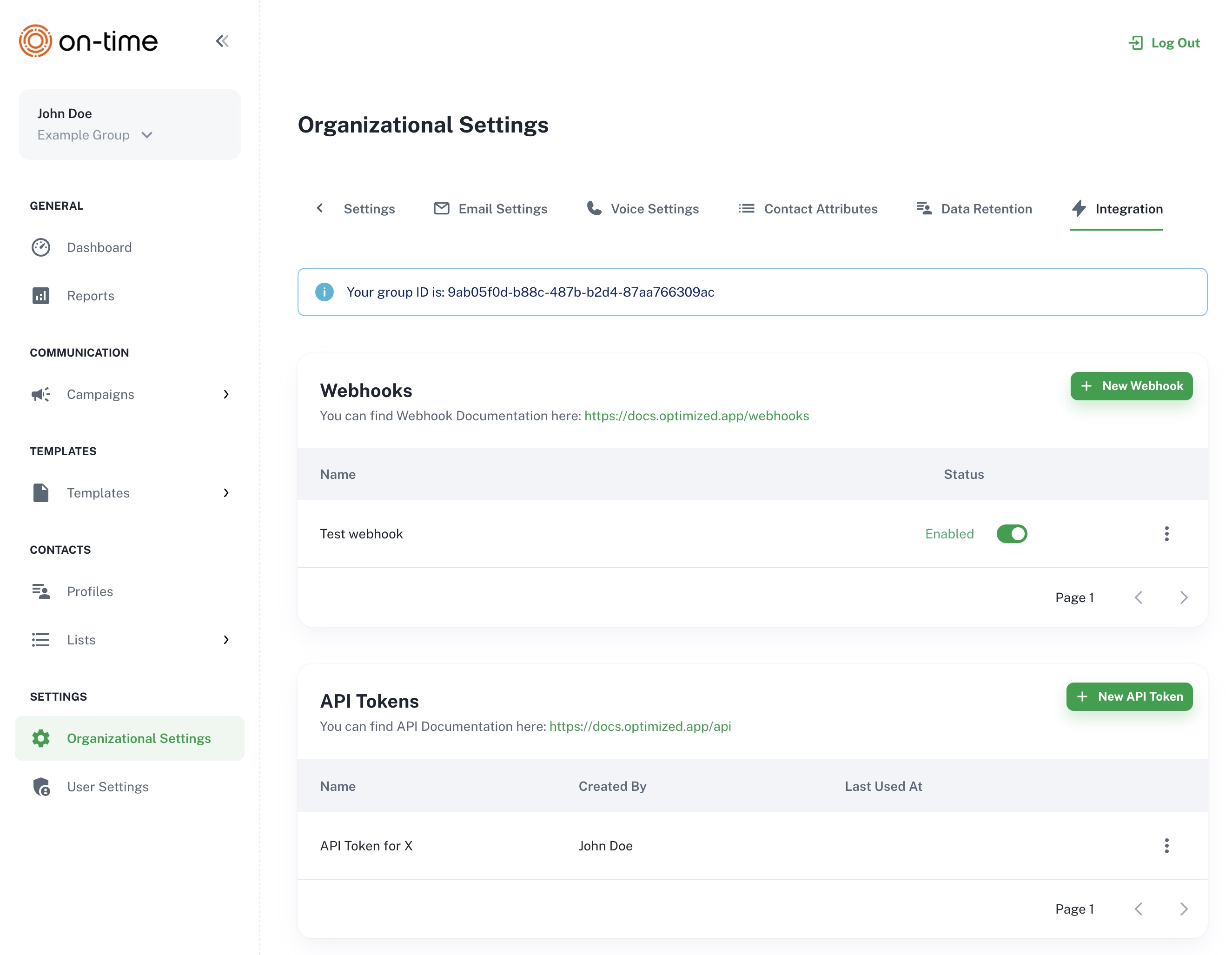
The Organization Settings → Integration screen, showing where to create a new Webhooks
- Test your webhook implementation with events before going live
- Implement proper error handling and logging in your webhook scripts
- Consider implementing a queue system for processing webhook data if you expect high volumes
If you encounter any issues with webhook integration, please contact Optimized.app support at support@ontime.fi.